In this task, you will do an experiment on yourself and then, at the end, consider some reflection questions.
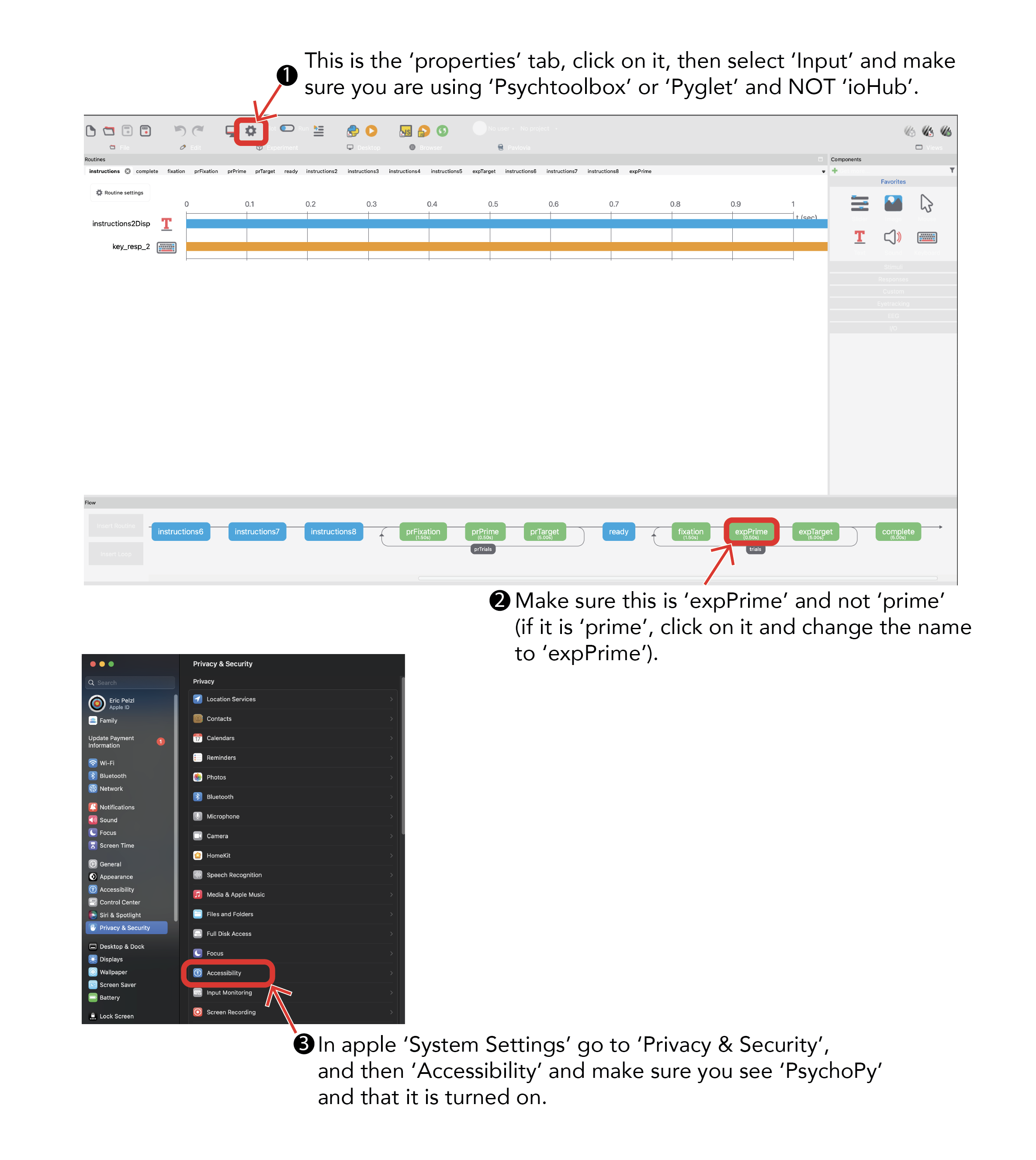
First, however, we need to do several things to set up the software. Follow the instructions below to set up the experiment. I've only tested these instructions on a Mac, if you have a PC, things might look different for you. If you have difficulties, this is a task where asking GenAI for help can be very effective.
A. Getting Psychopy
The software you will use for this experiment is called PsychoPy. It is a free software that is compatible with both PCs and Macs. It can be used to run almost any type of psychological experiment you can dream of. To install if, follow the steps below:
At the top, click on the "Standalone PsychoPy" button (make sure it has correctly identified your computer as PC/Mac). If you are more computer savvy, you can also look at other installation options.
The download may take several minutes. Your computer might ask you whether you want to save the file or open it. Either option is fine, but I think opening the file is easier. If you save it, make sure you know where you saved it.
Once the download is complete, click on the file to open it and follow the instructions
C. Downloading the experiment
There are currently three versions of the experiment: English, Chinese in traditional characters, and Chinese in simplified characters. Pick the one that you want to do, and download the zip file:
After downloading, save the file to your desktop or another location where you can find it easily. When you're ready to do the experiment, you will unzip the file and there should be three items that appear in a new folder.
(When you actually run the experiment, many new files will be created in the same location where you have this file. If you want to keep your desktop tidy. you can create a folder on your desktop and then save this file inside that folder. That is what I always do.)
D. Disable StickyKeys (for PCs)
Press one of the "Shift" buttons many times (like 10 or 15) quickly. If you're using Windows, this might cause a window to pop up, asking you "Do you want to turn on Sticky Keys?" If this happens, there will be a blue link at the bottom of the window, saying "Go to the Ease of Access Center to disable the keyboard shortcut". Click that link, which will bring up a new window. Find the option that says "Turn on StickyKeys when SHIFT is pressed five times", and make sure you UNcheck that option.
There is an important reason why we have to do this. After you finish the experiment, you can try to think about why we turned this off.
After you've finished doing this, you should confirm that it worked. Close all the windows that were opened in this step. Now, you should be able to press SHIFT a million times, quickly, and it shouldn't cause any window to pop up.
E. Do the experiment
We're almost ready to start the experiment. Make sure you're in a quiet environment with no distractions (this will not be possible if you're doing this in the classroom!). Once you start the experiment, it's like playing a video game; you will need to pay close attention and react quickly, so you can't be distracted. The experiment should take about 5-10 minutes.
Open the "Psychopy" programme that you installed before (or double-click the .psyexp file you unzipped). A few windows will open up, you can close the three small ones ('readme', and 'Tip of the Day', and 'PsychoPy Coder'). The remaining window should be a larger 'PsychoPy Builder' interface. From the drop down menus at the top, choose "File" and "Open" and select the .psyexp file from the folder you downloaded.
Next, from the drop down menu at the top of the screen, choose "Tools" and "Send to Runner", a new window ('PsychoPy Runner') will open and will check to make sure there are no errors (if it finds an error, you can ask me for help).
Read the rest of the instructions before you continue. Once you do the next step, the experiment programme will take over your screen, and you won't be able to see these instructions anymore (although you can still view them on another computer or your phone or whatever).
Now, in the PsychoPy Runner window, click on the Green triangle button to start the experiment. (The button may be Orange if you are in Pilot mode. Pilot mode will let you make sure the experiment is running smoothly before you try it for real. To leave Pilot mode, simply switch the blue dot from 'Pilot' to 'Run') Once, you click the triangle button, the program will start and, after a moment, you will be asked for a 'participant' ID, you can type your name (or any ID you want--just be sure to remember what it is). It also has a line for 'session', but you can just ignore that. Once you click OK, the experiment will begin. The beginning of the experiment will show you some instructions, and then give you a chance to practice. If you need to exit the experiment at any time, click the "Esc" button.
When the experiment is over, the program will stop and you will see your desktop and open windows again.
When you're ready, do the experiment!
When you've finished the experiment, continue on to the reflection questions below.
NOTE: If the experiment isn't working, HERE ARE SOME THINGS TO TRY ON A MAC. If those things don't work, I recommend you ask GenAI for help. It's usually very good for this type of task.
What do you think this experiment was about? That is to say, what aspect of your response do you think the researcher doing this experiment would be interested in, what kinds of data do you think the researcher would want to compare, and what do you think the results might show?
Now let's look at the experiment in a little bit more detail. First, find the results of your experiment. This will be in a folder called 'data' that should now exist in the place you opened the original zip file. There will be a few different files in the data folder, find the one with your ID that is a .csv file. Open it.
In the file you'll see a bunch of rows and columns. You can skip down to about the 20th row. Here you will be able to see all the words that were actually used in the experiment. Each line looks something like this (depending, of course, on which language you used):
農村 / 縣城 / A
The first word is the first word you saw before the main word; the last word is the word you actually responded to (i.e., the one that you had to judge was a real word or a non-word); the letter is a code that indicates the condition, which we can use when analyzing the results.
There are three groups of words in this experiment, which you can find based on the code in the 'condition' column. All the trials whose condition is 'nonword' are ones that had fake words; you can ignore those (you can also ignore the 'practice' trials). The important ones are those labeled 'A' and 'B' (normally, I would use more informative condition names than 'A' and 'B', but I want you to try to figure out what the conditions are).
Look through your list of words and explore the word pairs in condition A, and the word pairs in condition B. These are the two groups of words that we are going to want to compare.
What do you think is the important difference between the words in condition A and the words in condition B? Try to figure out a pattern and then keep your answer in mind as you move on to the next section of the module.
When you have finished the above activities, continue to the next section of the module: "Analyze your data" (to be COMPLETED BEFORE NEXT CLASS).
modified by Eric Pelzl; original content by Stephen Politzer-Ahles. Last modified on 2026-JAN-21. CC-BY-4.0.